THE RECLAIM BLUEPRINT: HOW TO DROP MULTI-APP MESS WIN BACK 10+ HOURS A WEEK, AND RUN YOUR TRADE BUSINESS FROM ONE SCREEN

Title & Introduction – The Invisible Leak in Your Trade Business

The Reality Check

You didn’t start your trade business to become a full-time, unpaid data-entry clerk. You started it for freedom, great money, and to master your craft. But lately, it feels like the business is running you.

If you are spending your evenings jumping between five different apps, chasing missing signatures, re-typing quotes into invoices, and trying to remember which client messaged you on Facebook versus SMS—you aren’t growing; you are just surviving.

The Brutal Truth: App chaos isn’t just wasting your time; it’s eating your profit margins and stealing your weekends.

The Purpose of This Blueprint

This is not a theoretical software guide or a hidden sales pitch. This is a practical, step-by-step roadmap showing you exactly how to eliminate “App Fatigue” and win back at least 10 hours every single week. We will map out your entire business from the moment a customer finds you to the moment the cash hits your bank account, showing you how to do it all inside one single ecosystem with one login.

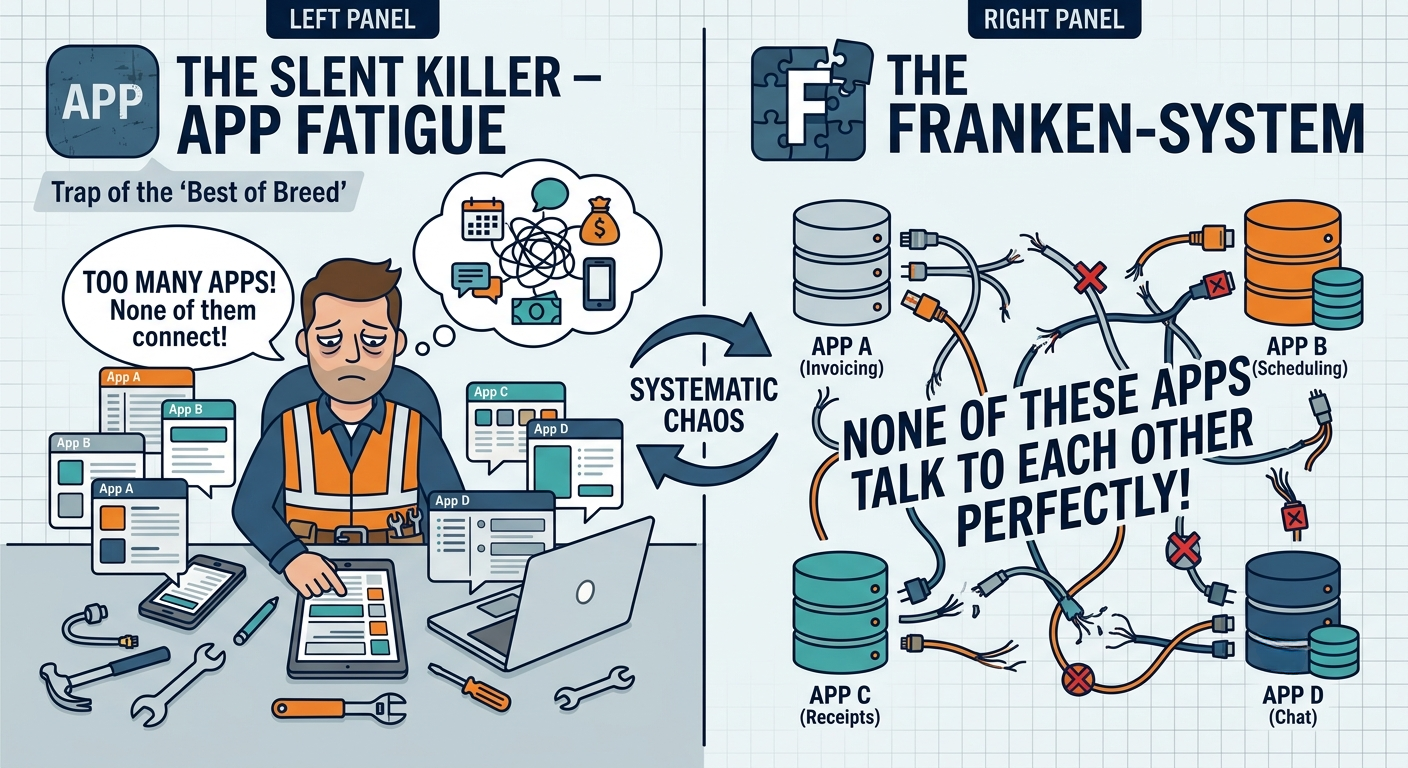
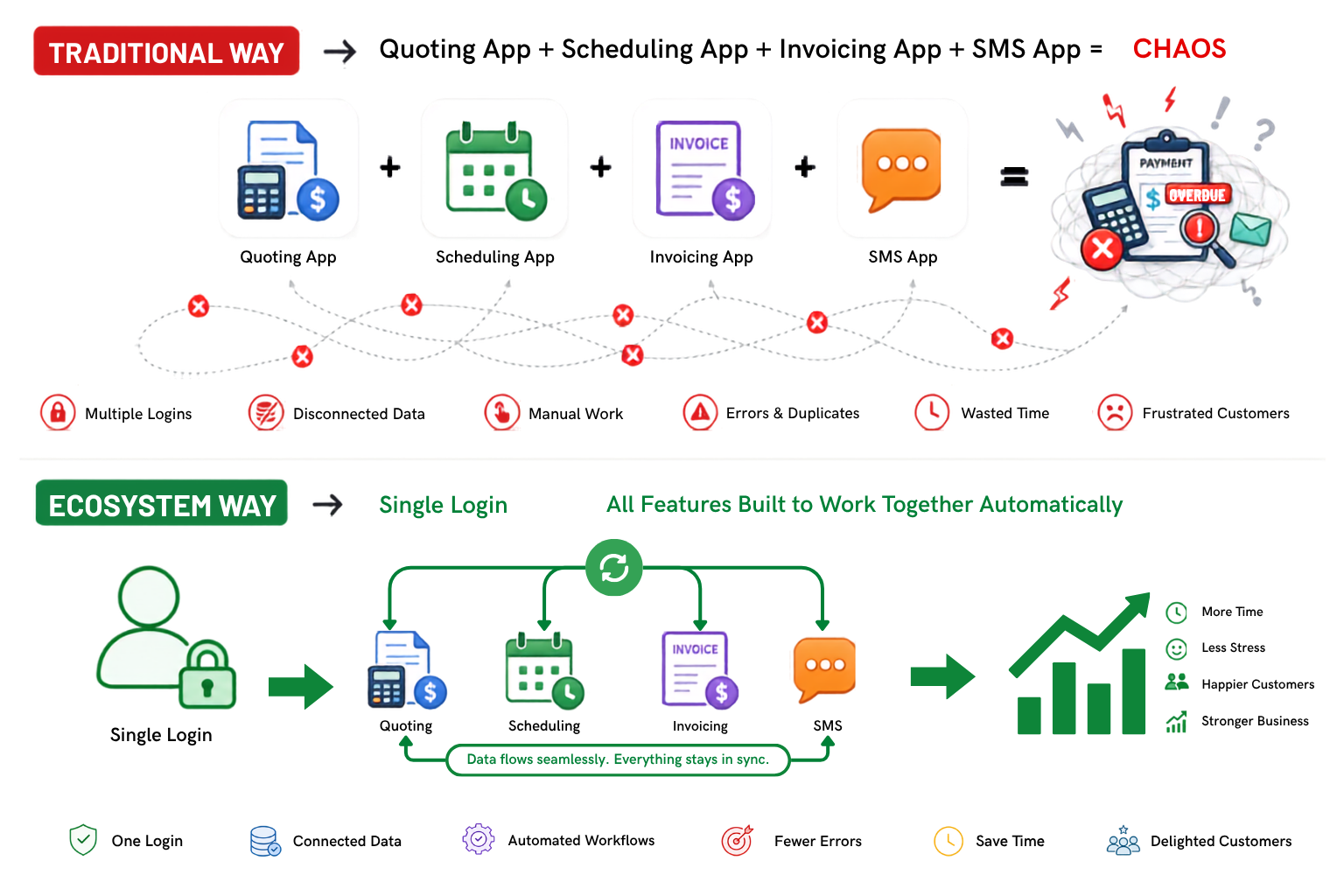
The Silent Killer – “App Fatigue” and the Franken-System

the silent killer – app fatigue and the franken system
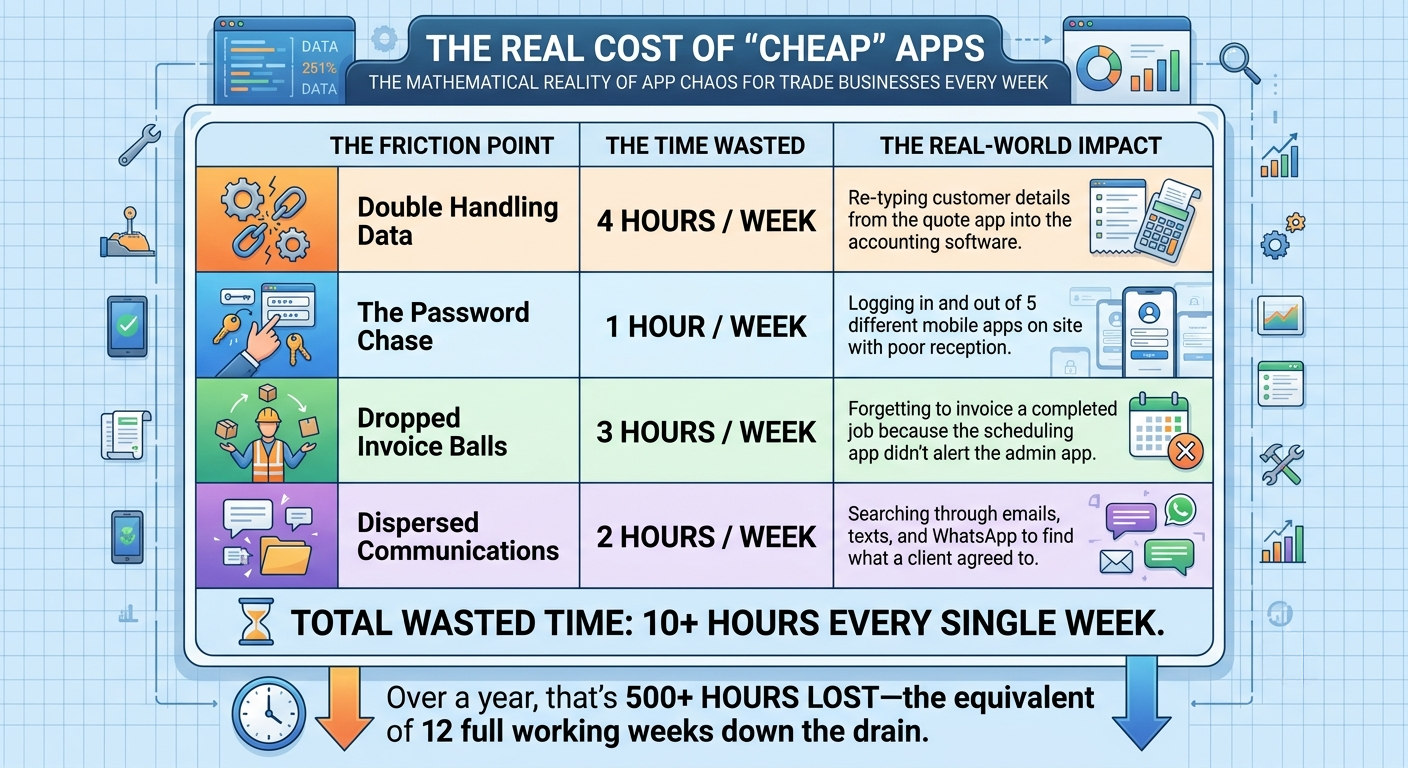
the real cost of cheap apps (2)

Meet Dave – A Story Every Tradie Knows

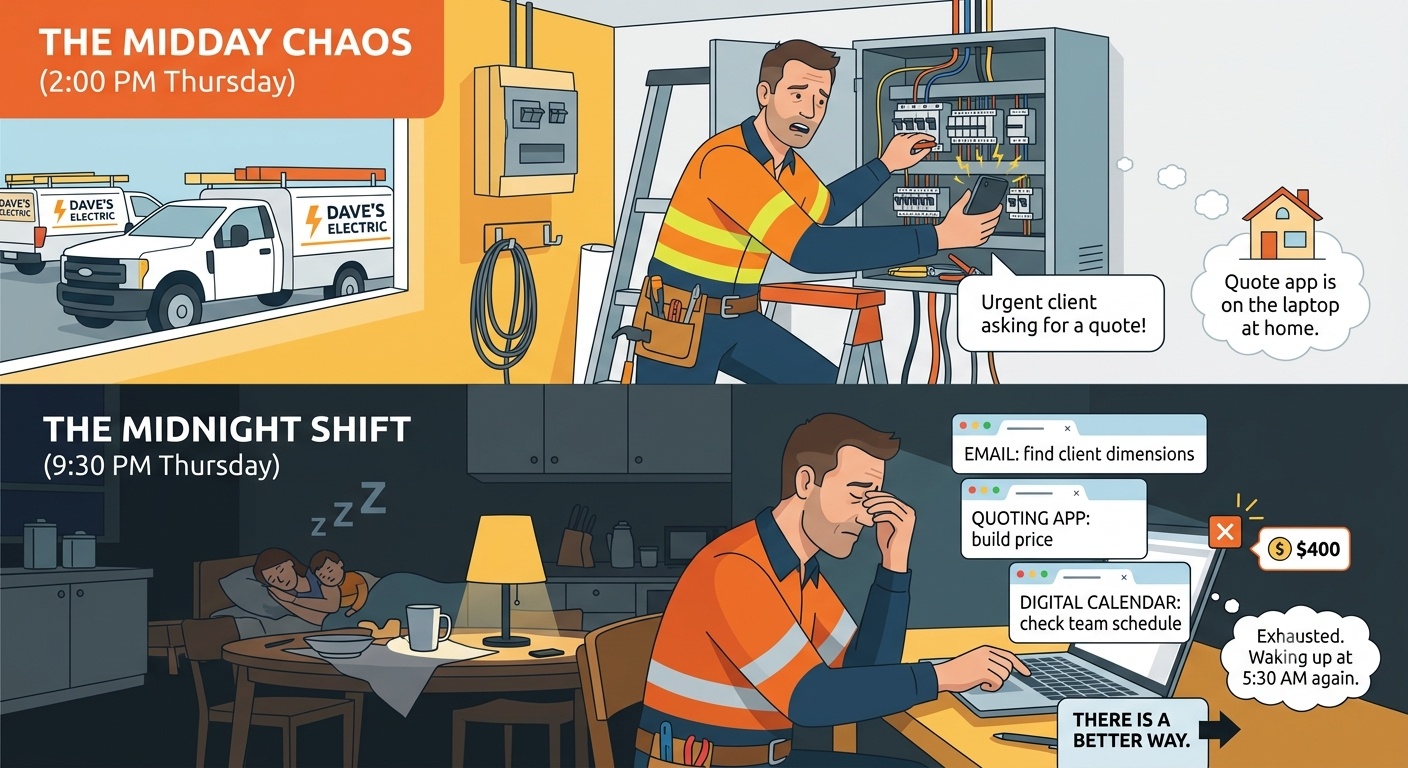
The Midday Chaos

Dave runs a commercial and residential electrical business with four trucks on the road. It’s 2:00 PM on a Thursday. Dave is on a ladder finishing a switchboard upgrade. His phone rings—it’s an urgent client asking where their quote is.

Dave can’t check right now because the quoting app is on his laptop at home. He promises to look at it tonight.

The Midnight Shift

Fast forward to 9:30 PM. Dave is sitting at the kitchen table. His family is asleep. He has three different browser tabs open:

  1. His email to find the client’s dimensions.

  2. His quoting app to build the price.

  3. His digital calendar to see if he even has a team free to do the work next Tuesday.

Dave is exhausted. He makes a typo on the quote, undercharging by $400. He hits send, knowing he has to wake up at 5:30 AM to do it all over again. There is a better way.

a story every tradie knows

The Unified Vision – What is a Single Ecosystem?

The Power of One Login (Single Sign-On)

Imagine waking up, opening your phone or laptop, and typing in one password. That single action unlocks your entire business.

You don’t need a separate field management app, a separate CRM, a separate email marketing tool, or a separate project tracker. Instead of buying individual apps and trying to force them to hold hands using messy third-party connectors, you use a pre-built ecosystem where every tool is born in the same house.

the power of one login (single sign on)) (2)

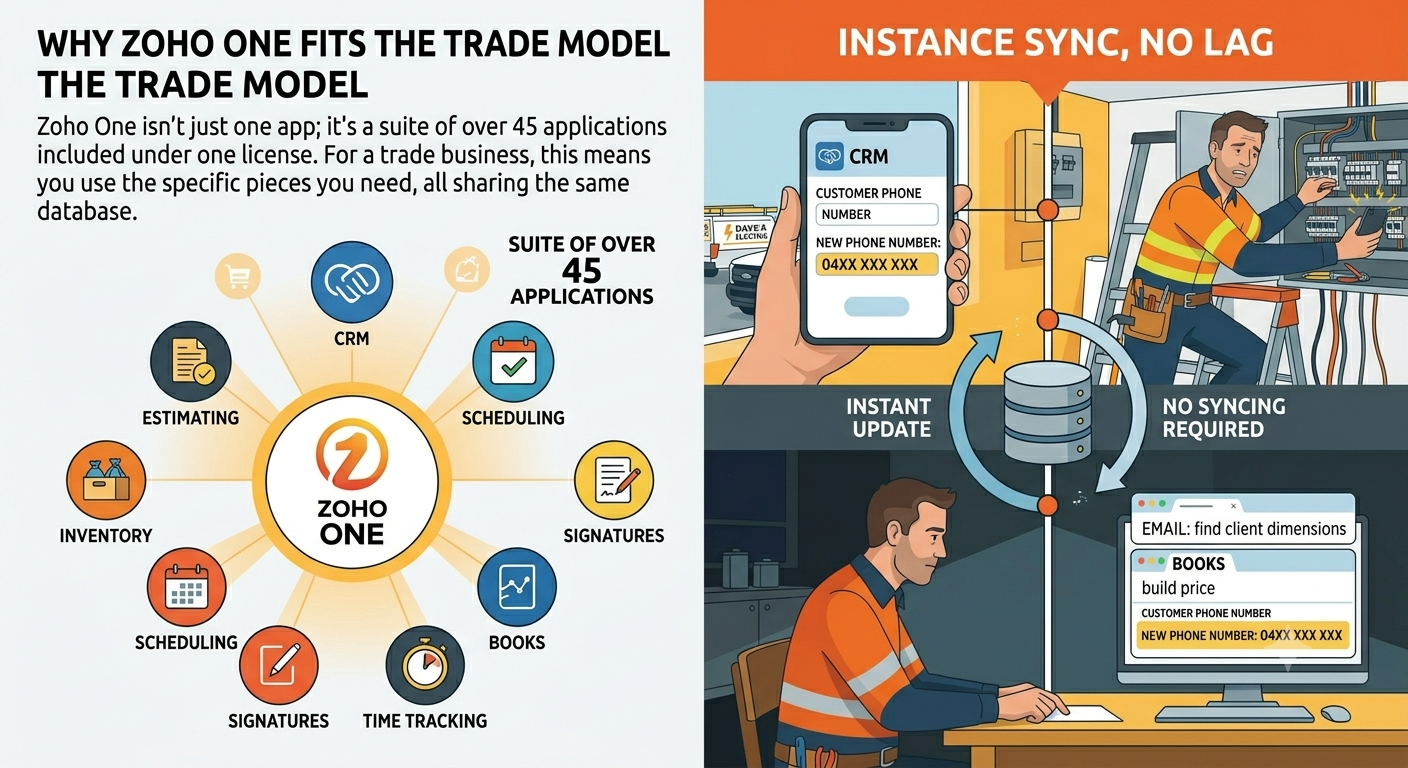
Why Zoho One Fits the Trade Model

Zoho One isn’t just one app; it’s a suite of over 45 applications included under one license. For a trade business, this means you use the specific pieces you need (CRM, Estimating, Scheduling, Signatures, Books), all of which share the same database. If you change a customer’s phone number on site, it instantly updates in your accounting view. No syncing required.

why zoho one fits the trade model

Phase 1 –The Lead Catchment (Stop Dropping Enquiries)

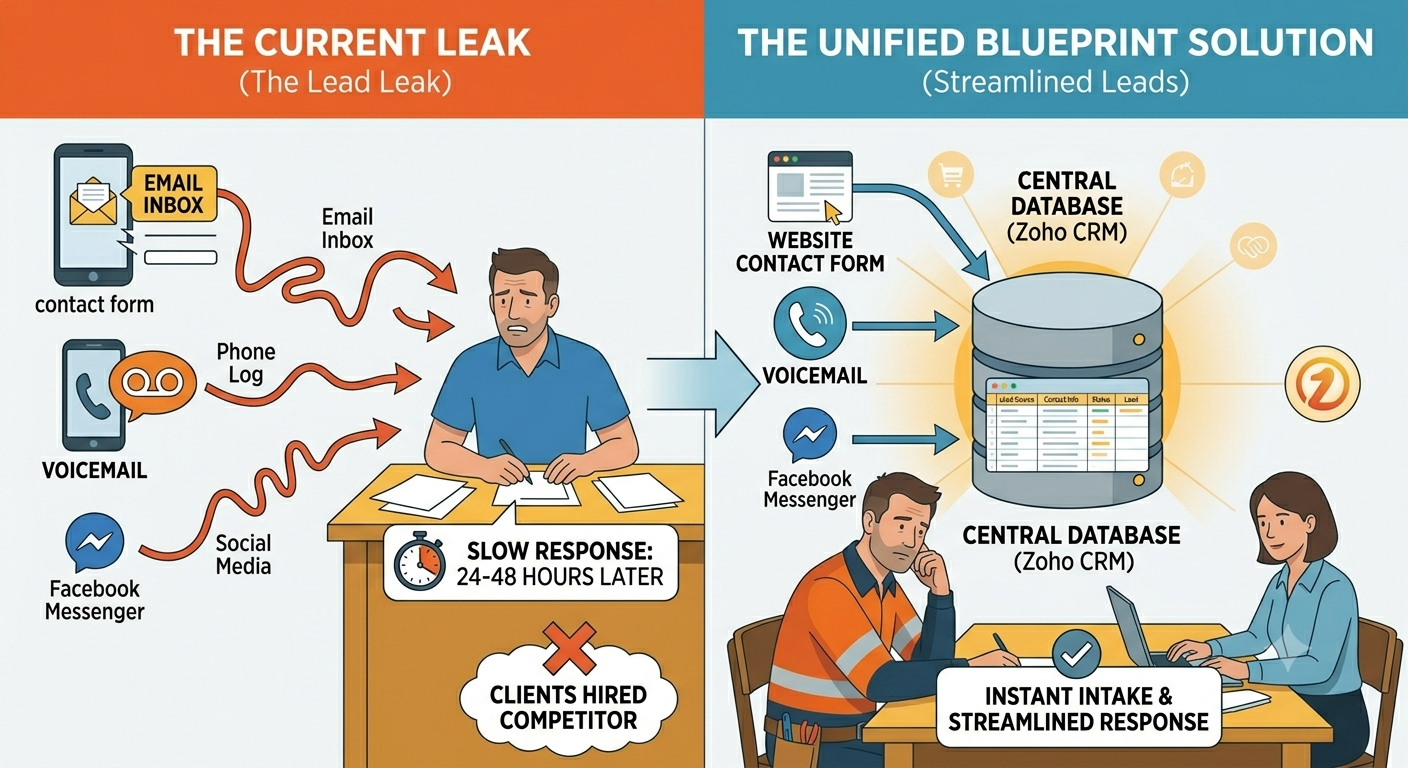
The Current Leak

A potential client visits your website, fills out a contact form, and it goes to your email inbox. Meanwhile, another client leaves a voicemail, and a third sends a Facebook message. Because these leads are scattered, you respond to them 24 to 48 hours later. By then, they’ve already hired your competitor who answered first.

The Unified Blueprint Solution

We map all inbound streams directly into your central database (Zoho CRM).

the lead catchment (stop dropping enquiries)

The Real Story

When Dave connected his website forms and Google Business profile directly to his central hub, he didn’t have to check three apps. The moment a local builder filled out a form requesting an urgent commercial fit-out quote, an automated, plain-text email went back to the builder: “Hey, got your request. Dave is on-site today, but our team is reviewing this. Expect your booking link in the next 60 minutes.”

The builder stopped looking for other sparkies immediately.
Phase 2 –Hassle-Free Estimating and Instant Sign-Offs

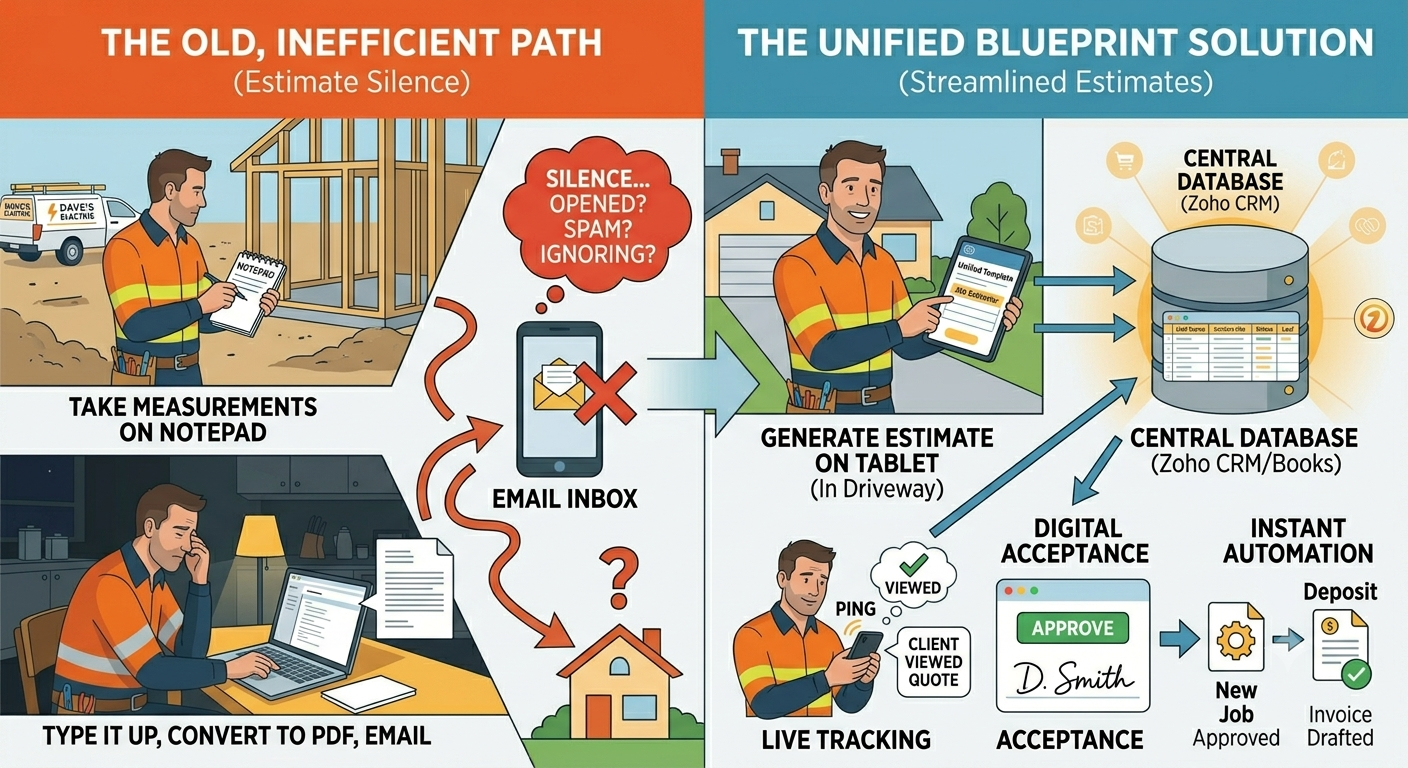
The Current Leak

You drive out to a site, take measurements on a notepad, go home, type it up, turn it into a PDF, email it to the client, and then… silence. You don’t know if they opened it, lost it in their spam folder, or are just ignoring you.

The Unified Blueprint Solution

You generate the estimate right from your tablet while standing in the client’s driveway using unified templates.

  • Live Tracking: The moment the client opens the link in their email, your phone pings: Client viewed quote.

  • Digital Acceptance: The client clicks “Approve,” signs their name with their finger right on their phone, and chooses a preferred deposit payment option.

  • Instant Automation: The system automatically converts that quote into an active Job and drafts the deposit invoice without you touching a button.

hassle free estimating and instant sign offs

Phase 3 –Smart Scheduling & Smart Dispatches

The Current Leak

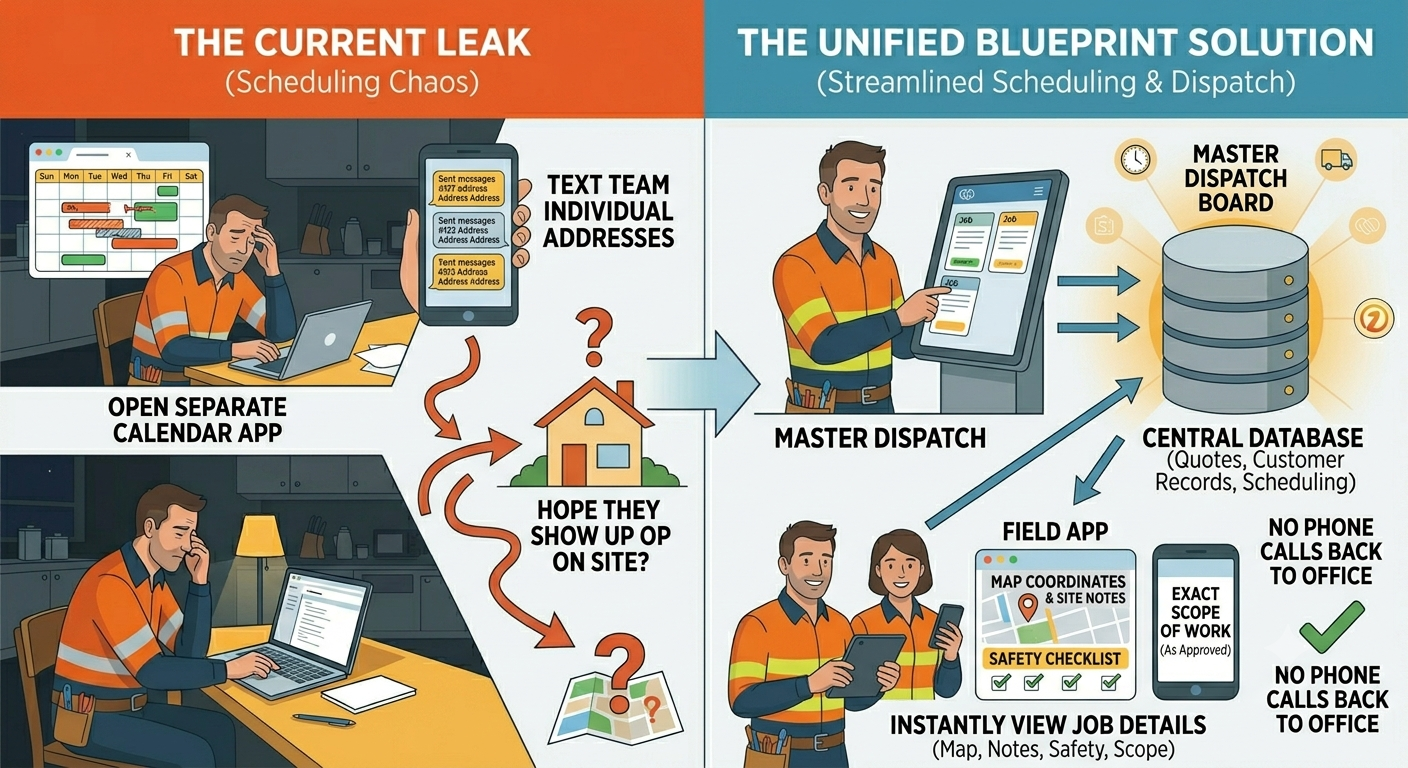
The quote is approved. Now you have to open your separate calendar app, look at where your guys are, text the team their addresses for the next day, and hope they show up to the right site with the right materials.

The Unified Blueprint Solution

Because your scheduling tool lives inside the same system as your quotes and customer records, the moment a job is approved, it appears on your master

dispatch board.

Your team opens their field app and instantly sees their map coordinates, site notes, safely checklists, and the exact scope of work approved by the client. No phone calls back to the office required.

smart scheduling & smart dispatches

Phase 4 – The On-Site Execution & Paperless Field Work

The Current Leak

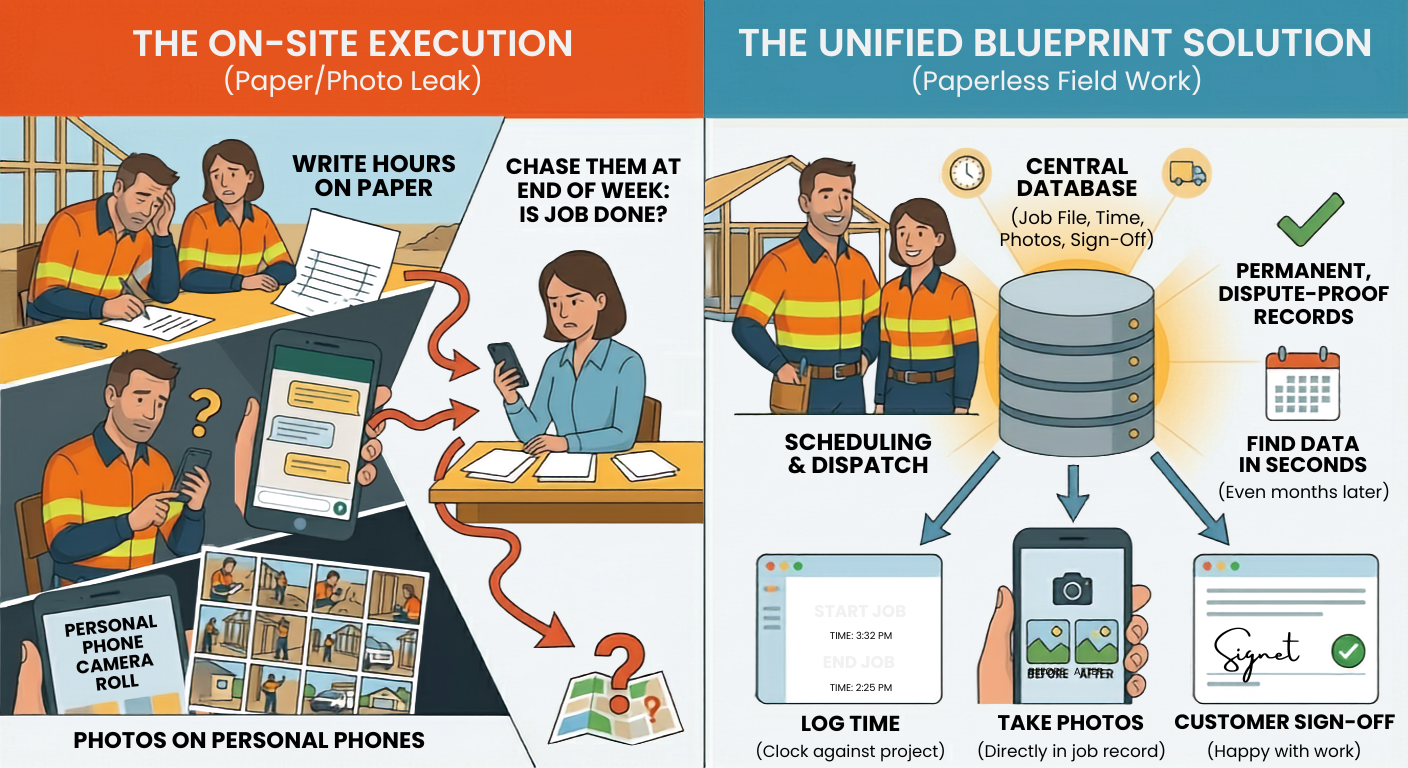
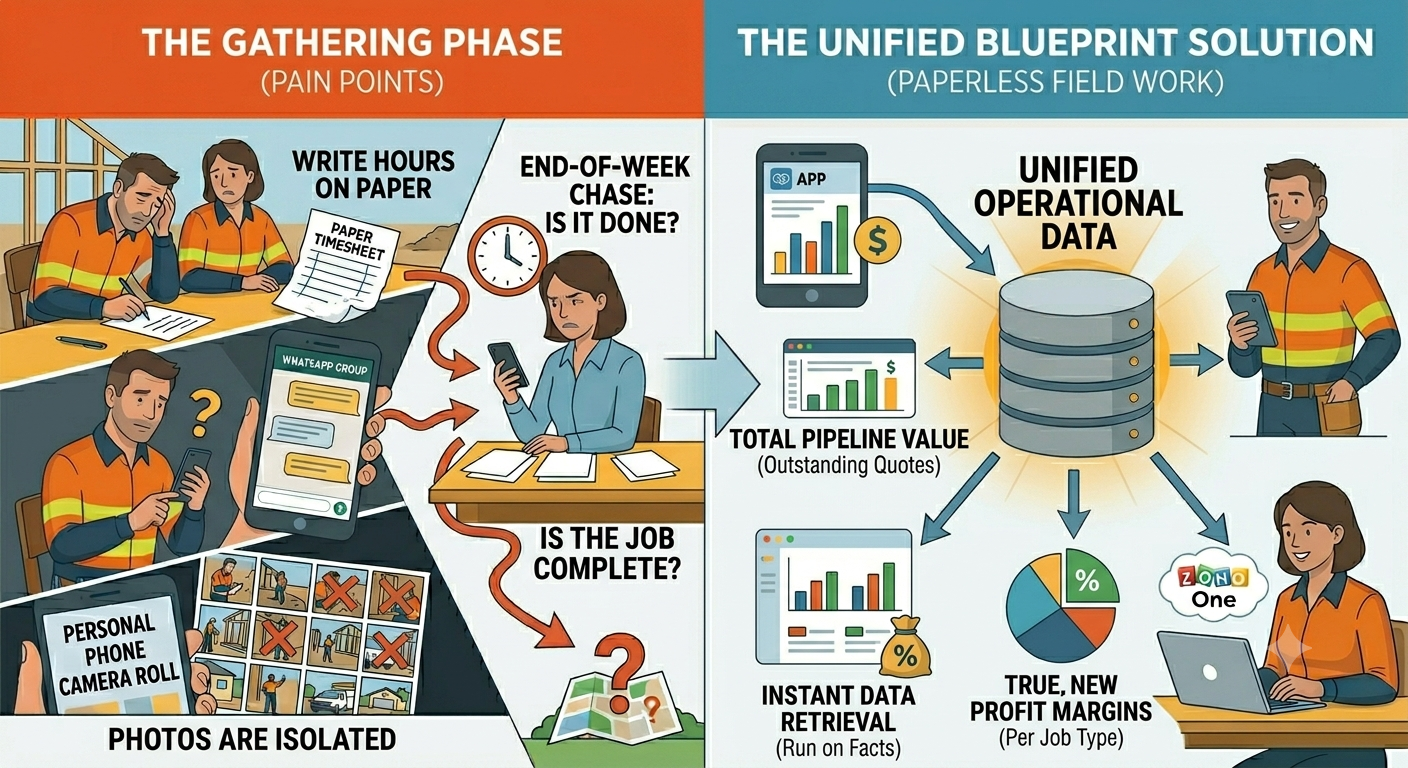
Your team completes the work. They write their hours on a paper timesheet or type it into a WhatsApp group. They take photos of the completed job and leave them sitting on their personal phone camera rolls. You have to chase them at the end of the week just to find out if the job is actually done.

The Unified Blueprint Solution

While on-site, your field technicians use their mobile access to handle everything cleanly:

  • Log Time: They hit “Start Job” and “End Job” to clock their exact time against the project.

  • Visual Proof: They take before-and-after photos directly inside the job record.

  • On-Site Sign-Off: The customer signs the screen to confirm they are happy with the completed work.

All this data sits in the job file permanently. If a client disputes a bill three months later, you have the exact timestamps and photos right there in seconds.

the on site execution & paperless field work

Phase 5 – The Frictionless Invoice & Automated Cash Collection

The Current Leak

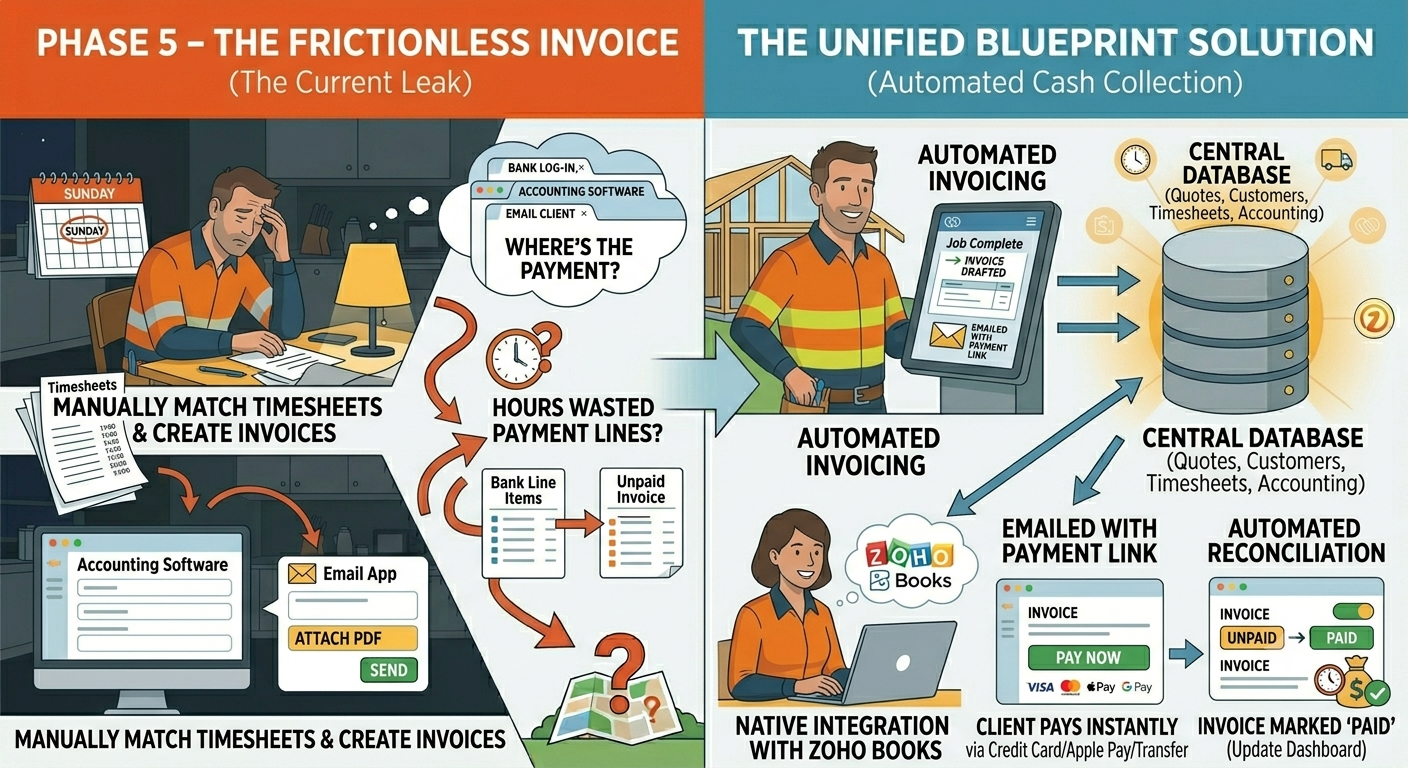
This is where tradies lose hours. You sit down on Sunday to match up completed jobs with timesheets, manually create invoices in your accounting software, and email them out. Then you have to log into your bank account every few days to see who actually paid you, manually matching bank lines to unpaid invoices.

The Unified Blueprint Solution

Because your accounting software (Zoho Books) is fully native to your job system, the workflow is seamless:

the frictionless invoice & automated cash collection

Mapping the End-to-End Tradie Blueprint

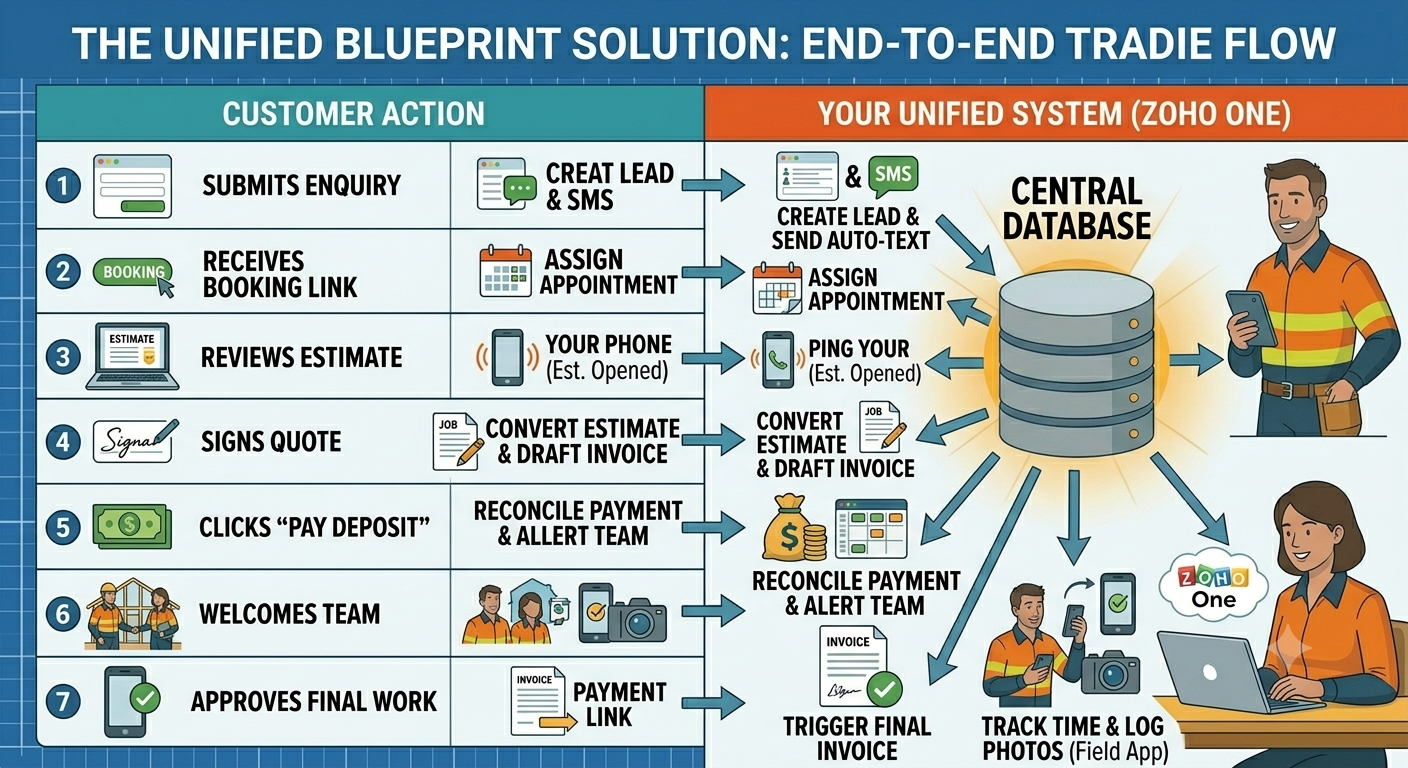
Here is exactly how your business flows through a single ecosystem, showing what you do versus what the system handles on your behalf.

mapping the end to end tradie blueprint

The Reality of Implementation – Step-by-Step

Do not try to move your entire business into a new system overnight. That is how balls get dropped and teams get frustrated. Follow this proven, staged approach.

Week 1: Core Foundation (The Database)

Set up your single login. Import your clean customer list. Connect your business email domain so all incoming and outgoing communication is tracked under each customer’s file.

Week 2: Money & Pipeline (Quotes & Invoices)

Build your custom quote and invoice templates. Brand them with your logo and colors. Connect your payment processor so you can begin accepting digital card payments immediately.

Week 3: Field Operations (Scheduling & Team Apps)

Bring your field crew onto the platform. Download the mobile apps to their phones. Run a 30-minute toolbox talk to show them how to view their schedules, log hours, and attach job photos.

Change Management – Getting Your Crew on Board

Overcoming the “More Paperwork” Complaint

Your team doesn’t want to use a clunky app, and they hate feeling micro-managed. If you introduce a system poorly, they will resist it.

How to Pitch it to the Boys

Frame the shift around their convenience, not just your office administration:

“Guys, we are getting rid of the messy timesheets and the constant text messages. From Monday, everything you need for the day is inside this one app. You don’t have to call me for addresses, you don’t have to text me when you finish a job, and you don’t have to write down your hours on paper at the end of the week. Do it in the app, and your pay is processed accurately every single time without delay.”

Provide a simple, clear boundary: If it’s not logged in the system, the job didn’t happen. Within two weeks, the team will prefer the app over chasing loose paperwork.

The Freedom Dashboard – Running the Business on Facts

Moving Past the “Gut Feeling”

Most tradies check their bank balance to see how their business is performing. If there’s cash, they feel good. If it’s low, they panic. This is reactive and incredibly stressful.

Your New Single-Screen Reality

Because all your data lives in one place, you can open a single dashboard every Friday afternoon and see your real operational numbers clearly:

  • Total Pipeline Value: The dollar amount of all outstanding quotes currently sitting in the hands of customers.

  • Team Efficiency: Exactly how many hours your crew logged on-site versus how many hours were actually invoiced.

  • True Profit Margins: Your exact revenue minus your material costs and labour costs, calculated automatically per job type.


the freedom dashboard – running the business on facts

Frequently Asked Questions by Real Tradies

“I already use Xero. Do I have to throw it away?”

No. While Zoho has its own brilliant accounting platform (Zoho Books), it also plugs cleanly into Xero. You can keep your accountant completely happy using Xero for your tax compliance while running your actual daily operations, quoting, and job tracking through the Zoho ecosystem.

“What happens if my internet drops out while I’m on a job site?”

The mobile field apps are designed to work completely offline. Your team can still look up job details, track their hours, and take site photos. The moment their phone connects back to 4G, 5G, or Wi-Fi, all the updated information uploads and syncs back to the office seamlessly.

“Is my customer data safe in one single place?”

Yes. Having your data securely encrypted inside an enterprise-grade cloud ecosystem with multi-factor authentication is significantly safer than having customer names, phone numbers, and home addresses scattered across loose paper diaries, sticky notes, and individual unmanaged apps.

Your Blueprint Checklist – Next Action Steps

This blueprint is designed to be an actionable guide. Take back your evenings by checking off these logical steps to systemize your trade business:

[ ] Audit Your Tech Spend: Write down every single app you currently pay a monthly subscription for and note where you are double-handling customer data.

[ ] Map Your Core Workflow: Draw out your exact customer path from the initial phone call or website click to the final paid invoice.

[ ] Consolidate to a Single Login: Set up your unified Zoho One environment to replace individual, disconnected tools.

[ ] Standardize Your Templates: Load your standard pricing, material line items, and brand styling into your centralised system.

[ ] Train Your Field Team: Conduct a straightforward toolbox talk to get your crew using the mobile app out on site.

[ ] Reclaim Your 10 Hours: Stop working at 9:30 PM on your kitchen table, and start using your automated dashboard to run your business cleanly.

1 LOGIN, 10+ HOURS WON BACK

Stop paying for five different apps that refuse to talk to each other. See exactly how to streamline your leads, jobs, and cash flow into a single, automated ecosystem built for the trades.